
NFS Server and Client Setup Guide
3. create a directory and give the full permission to /sankar/nfs directory
#mkdir -p /sankar/nfs
#chmod 777 /sankar/nfs
4. After that open the configuration file and give the entry
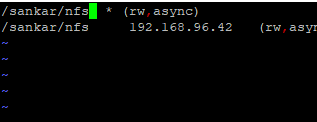
# vim /etc/exports
/sankar/nfs 192.168.96.42(rw,sync) Save and exit After that export the shared director
#exportfs -avr After that it has update on this file
#firewall-cmd - -add-service=nfs --permanen
#firewall-cmd - -add-service=mountd --permanent
#firewall-cmd - -add-service=rpc-bind --permanent After that reload firewall services
#firewall - -cmd --reload Then we have to restart the services
# systemctl restart nfs
Goto client
# yum install nfs-utils* -y
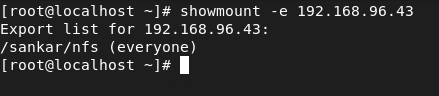
Then check the exported NFS shared directory by
# showmount -e 192.168.96.43 create one mount point
#create the directory for mount purpose
#mkdir /client After that Mount the shared directory
#mount 192.168.96.43 :/sankar/nfs /client ----> temporary mount
#df –hT ----> check the mount point Permanently mount Open the /etc/fstab
#vim /etc/fstab
192.168.96.43:/sankar /nfs client nfs defaults 0 0
Save and exit
#mount -a
#df -hT
No comments to display
No comments to display